Case studies





Automated Ordering on a Supplier Website With No API
A service that places orders on a supplier website with no API. It takes a purchase request through an API, drives a real browser to search the catalog and check out, and reads each order's status once a day. If the price does not match or the balance is too low, it stops the order and emails the people responsible.

Project Background
Our client buys components from a supplier through the supplier's website. The client keeps its own database with product prices.
Staff placed each order by hand on the supplier's website, and it took too much of their time.
This service was built to take that work off the staff. Another system sends a purchase request, and the order is placed with no manual steps. The client's database gets the latest status of every automated order, updated daily.
The Challenge
The supplier has no API. The only way to place an order is through the website, the same way a person does it. Any automation has to open the site, log in, use the catalog search and click through the cart and checkout.
Search does not always return one product. A query can match several items. The service has to go through the results and pick the one whose name matches exactly.
The price and the balance need checking. The price on the supplier's site can differ from the price in the client's database. The balance on the supplier account can be too low for the order. In both cases the order must not go through, and a person has to know about it.
An order is not finished when it is placed. Its status changes on the supplier's side, and the only place to read it is the website.
The Solution
The core of the service is an API that accepts purchase requests, a queue that holds them and a worker that drives a real browser on the supplier's site.
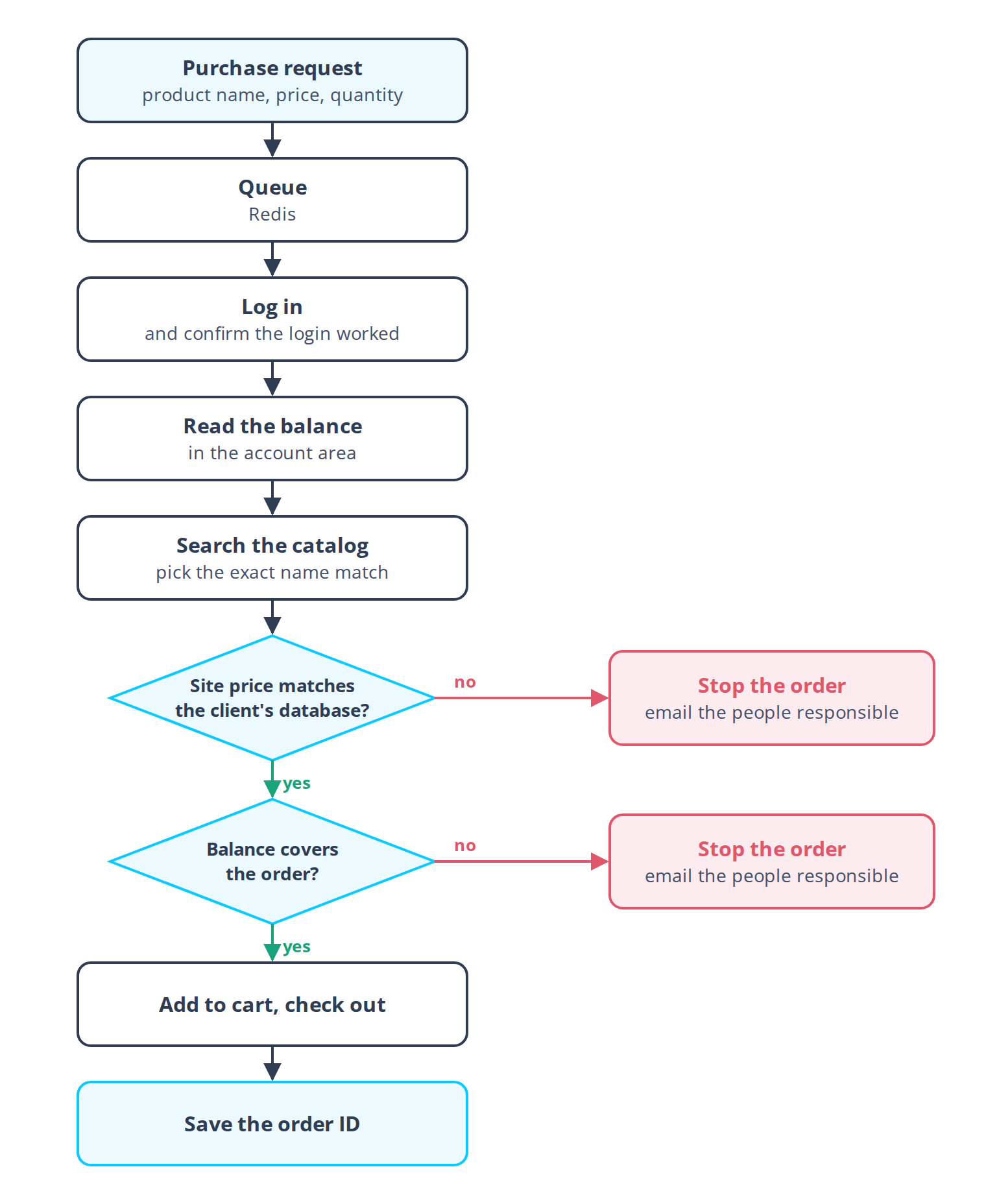
Check before checkout. The service checks two things before it adds anything to the cart. The price on the site must match the price in the client's database. The account balance must cover the order. If either check fails, the order stops and the people responsible get an email.
Follow the steps a person would take. The worker repeats what a buyer does in the browser. It accepts cookies, logs in, opens the catalog, searches, opens the product and checks out. Before it goes further, the worker confirms that the login worked.
How the Service Works
Request intake. A REST API built with FastAPI receives the request. The request holds the product name, the price and the quantity. The API puts it into a queue.
Queue. The queue runs on Redis. It separates intake from the browser work.
Placing the order. The worker takes the next request and opens the supplier's site with Playwright. It logs in, checks that the login succeeded and reads the balance in the account area. It then searches the catalog. If the search returns several products, it picks the exact name match. On the product page it runs the price and balance checks. If both pass, it adds the product to the cart, checks out and saves the new order ID.
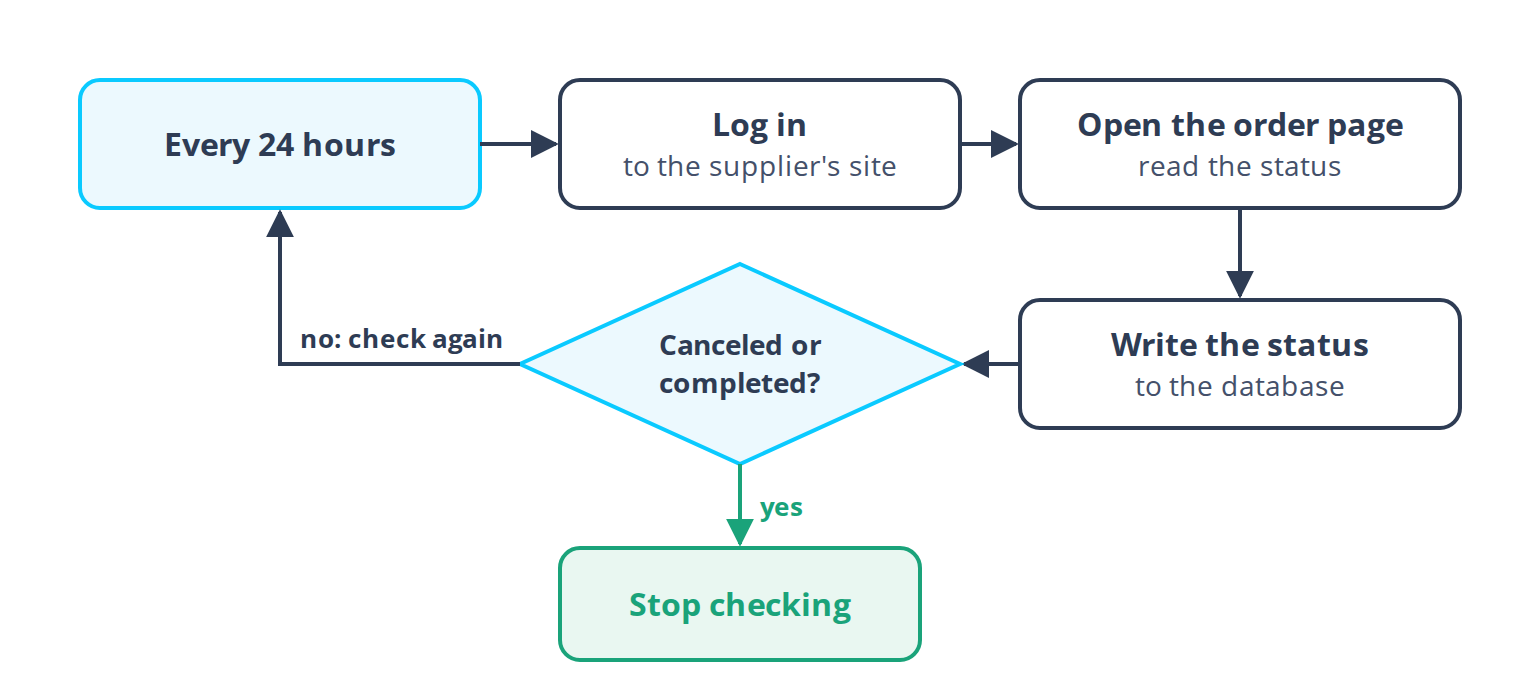
Status updates. A second task in the worker runs once every 24 hours. For each automated order, it logs in, opens the order page, reads the status and writes it to the client's database. It keeps checking until the order is either canceled or completed.
The two tasks, placing orders and updating statuses, run asynchronously in one worker.
Architecture
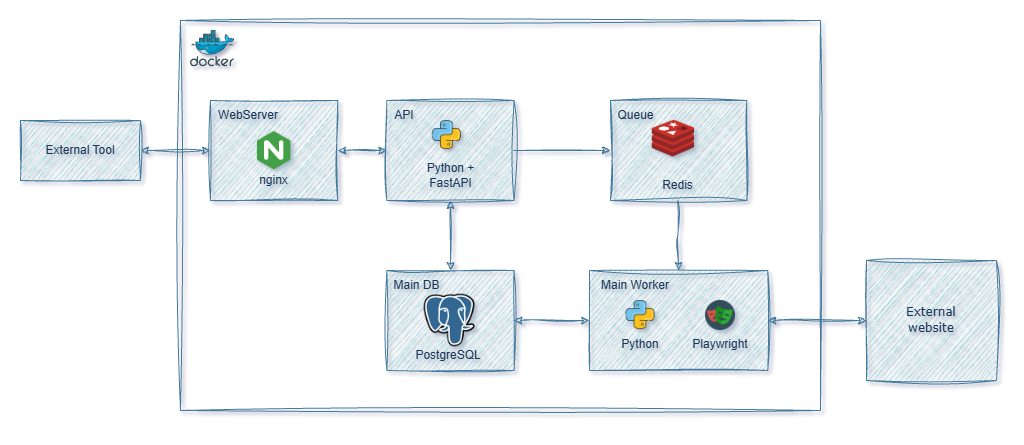
The whole service runs in Docker containers under Docker Compose, so it can be deployed on any server. Nginx sits in front. It terminates SSL and routes requests to the API.
Technology Stack
- Language: Python.
- API: FastAPI (REST).
- Browser automation: Playwright.
- Queue: Redis with Lua scripts.
- Database: PostgreSQL.
- Web server: Nginx (proxy, SSL).
- Deployment: Docker, Docker Compose.
Outcomes
We have no measured figures to publish for this project. The changes below come from how the service is built.
- Orders are placed from an API request. Nobody has to click through the supplier's site for each one.
- An order at an unexpected price, or one the balance cannot cover, stops before checkout.
- The status of every automated order is read from the supplier's site daily.
- The service runs in containers and can be deployed on another server with Docker Compose.
Summary
The service places orders on a supplier website that has no API, and once a day it writes the status of each order to the client's database.

Try us for 14 days
Want to start a 2-week free trial period with us? Leave your email below and we'll revert to you shortly with more details