
WordPress shines when you need speed, content-first functionality, and affordable WordPress website development. Small to medium businesses love it. But here's the thing - it becomes a proper headache when your organisation hits complex editorial workflows, severe traffic spikes, or security demands that plugins can't handle. The platform runs over 43% of websites worldwide, which sounds impressive until you realise that dominance means nothing if it's wrong for your particular situation.
Here's what we'll unpack:
- The specific scenarios where WordPress accelerates business growth
- Warning signs that WordPress is constraining your organisation
- How to evaluate whether your current setup is helping or hurting
- Cost realities at different scales of WordPress development
- When migration becomes the more intelligent business decision
Why WordPress Works Brilliantly for Content-Driven Businesses
Right. Let's talk about where WordPress genuinely earns its reputation. Publishing content? Managing a blog? Running a fairly standard online shop? WordPress handles these beautifully. It's been doing so for two decades, and the platform has matured considerably.
Fresh Stat: As of January 2026, WordPress powers approximately 43.5% of all websites and commands over 62% of the CMS market - nearly nine times larger than its closest competitor, Shopify.
Those numbers didn't happen by accident. The ecosystem houses over 58,000 plugins and thousands of professionally crafted themes, which means you can have a functional, polished website live within weeks - not the months that custom builds demand typically.
The Cost Advantage for SMEs
Money talks. For European SMEs, the financial case is hard to argue with. A professional WordPress site covering standard needs - product catalogues, blog posts, lead capture forms, basic e-commerce - runs between €6,000 and €18,000 through a decent WordPress development services agency. Custom-built alternatives? Easily three to five times that figure. Sometimes more.
Managed hosting starts under €35 monthly now. That's remarkable, really. Even businesses that watch every euro can afford proper infrastructure. We've helped plenty of European SMEs at Flexi IT launch WordPress sites that genuinely outperform what their budgets would suggest - sites with real functionality and thoughtful design that compete against much larger competitors.
Content Management That Marketing Teams Actually Use
Gutenberg changed things. Properly. The block editor means your marketing people can publish, reorganise, and update content without badgering developers every five minutes. That autonomy matters hugely when content velocity determines business results - and let's be honest, for most organisations it does.
SEO capability sits right in WordPress's DNA. Clean URLs. Semantic HTML. Mobile responsiveness out of the box. Native XML sitemaps. You're not fighting the platform to rank well; you're working with it. Add a plugin like Yoast, configure it sensibly, and you've got a solid technical SEO foundation without hiring specialists.
When Does WordPress Become the Right Choice?
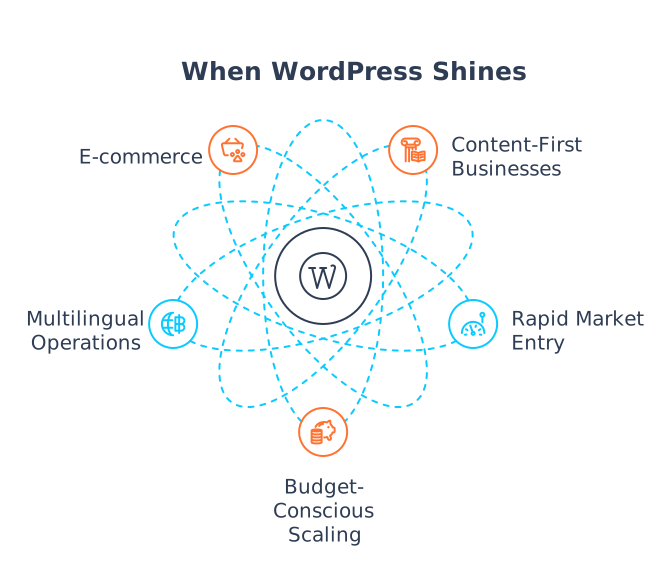
After years of delivering WordPress development services across European markets, we've spotted clear patterns. These are the situations where WordPress genuinely moves the needle:
1. Content-First Business Models
Publishers get it. Bloggers get it. Thought leadership platforms and news outlets understand instinctively why WordPress works for them. The combination of flexible content management, strong SEO bones, and a mature ecosystem creates something competitors struggle to replicate. If content is what you sell - or what sells you - WordPress probably fits.
2. Rapid Market Entry Requirements
Speed matters sometimes. A lot. When getting to market quickly trumps having bespoke everything, WordPress delivers. Four weeks to a professional web presence instead of four months? WordPress themes development and smart customisation make that entirely achievable.
3. Budget-Conscious Scaling
Not everyone has venture capital burning holes in their pockets. Organisations that need a credible digital presence without betting the farm on technology find that WordPress offers a sensible path forward. Adding features through plugins rather than commissioning custom code keeps initial investment reasonable while leaving room to grow.
4. Multilingual European Operations
This is where WordPress genuinely excels for European businesses. Multilingual content delivery works well through native multisite architecture or established translation plugins. Organisations juggling multiple languages, regulatory frameworks, and regional variations have gravitated toward WordPress for years - and for good reason.
Worth Noting: WordPress 7.0, scheduled for April 2026, will continue advancing Phase 3 of the Gutenberg project - focused on collaboration - with Phase 4 bringing native multilingual support directly into core.
5. E-commerce with Standard Requirements
WooCommerce powers 6.5 million live shops. It commands roughly a third of global e-commerce. Selling physical goods or digital products without byzantine inventory requirements? WooCommerce handles it. It's proven, well-documented, and the extension ecosystem is vast.
When WordPress Actively Hinders Growth
Now the uncomfortable bit. WordPress can become a genuine roadblock when what your organisation actually needs diverges from content management - the thing WordPress was built to do. We've seen it happen. It's not pretty.
Performance Degradation at Scale
Here's WordPress's biggest weakness. Poorly optimised installations at scale are prone to failure. Every page request fires multiple database queries - sometimes dozens for a single homepage load on a neglected site. Each query consumes server resources. Under normal traffic? Fine. Manageable.
But traffic surges multiply everything. Ten times as many visitors means ten times as many database queries, hammering the same server simultaneously. The cascade begins. Pages slow. Then they crawl. Eventually? Nothing loads at all. Your site effectively disappears precisely when you need it most.
The Plugin Complexity Trap
This catches people out constantly. A typical WordPress installation might run twenty-odd plugins: SEO, caching, security, analytics, forms, membership, payments, and various custom bits. Seems reasonable. Each plugin, though, adds overhead - code execution, database queries, potential conflicts with other plugins.
Security Reality: Research indicates that approximately 95% of WordPress vulnerabilities originate in plugins rather than WordPress core. Reported vulnerabilities increased by 34% from 2023 to 2024.
The maths on security risk compound nastily. Twenty active plugins mean twenty separate vulnerability surfaces. Each follows its own update schedule. Each has its own security standards - or, in some cases, a lack thereof. We've audited WordPress sites at Flexi IT, where forgotten, deactivated plugins contained critical vulnerabilities with public exploits. Nobody had checked them in years. Attackers had.
Collaboration and Workflow Limitations
WordPress wasn't designed for teams. Not really. Multiple editors working on the same content simultaneously? They risk overwriting each other because there's no native version control for content. The database stores everything - content, configuration, user data - without tracking changes, maintaining audit trails, or offering rollback options.
Enterprises with compliance obligations feel this acutely. Regulated industries require separation of duties, detailed audit trails, and formal approval workflows. WordPress provides none of that natively. You either bolt on third-party solutions, build custom workarounds, or accept that the platform doesn't fit your governance requirements.
Warning Signs Your WordPress Site Is Constraining Growth
How can you tell when WordPress has shifted from asset to liability? These patterns appear reliably:
| Warning Sign | What It Indicates |
|---|---|
| Marketing can't launch landing pages without developer help | WordPress customisation has become too complex for your theme |
| Performance issues persist despite optimisation investments | Architectural limitations have been reached |
| Plugin conflicts occur with every update | Technical debt has accumulated beyond manageable levels |
| Security audits consistently flag concerns | Plugin-based security is insufficient for your requirements |
| Developer costs for "simple" changes keep climbing | The platform no longer matches your business model |
The Real Cost Picture: What WordPress Development Actually Costs
WordPress looks cheap. Initially, the reality involves non-linear cost growth that catches organisations off guard as complexity accumulates. Let's be straight about what things actually cost:
Initial Development Costs
- Basic business website: €6,000 – €18,000
- Custom e-commerce store: €18,000 – €84,000
- Enterprise WordPress deployment: €50,000+
Ongoing Annual Costs
- Managed hosting: €420 – €1,200/year
- Premium themes and plugins: €350 – €1,200/year
- WordPress website maintenance: €3,600 – €8,400/year
- Security solutions: €600 – €4,200/year
A comprehensive custom WooCommerce store - one reflecting genuine business complexity - costs €18,000 to €84,000 upfront. Then €300- €720 monthly covers maintenance, hosting, and plugin subscriptions. At some point, you're paying custom-development money while accepting WordPress's architectural constraints. That's a bad trade.
Enterprise-Scale Reality Check
Organisations pushing WordPress to enterprise scale - millions of monthly pageviews, complex content models, mission-critical availability - discover something inconvenient. Cost advantages vanish entirely. Enterprise WordPress demands:
- Managed enterprise hosting: €600 – €3,000+ monthly
- Ongoing support and maintenance: €600 – €24,000+ monthly
- Custom development at enterprise complexity
Enterprise WordPress isn't cheap. Full stop. Choosing it represents an architectural decision about flexibility and ecosystem access, not a cost optimisation strategy. Anyone telling you otherwise hasn't done the sums properly.
Making the Right Decision for Your Business
The question was never "Is WordPress good or bad?" That framing misses the point entirely. What matters is whether WordPress aligns with your specific requirements, your team's capabilities, and your business's direction.
Choose WordPress When:
- Content management is your primary need
- You require rapid deployment (weeks, not months)
- Budget constraints make custom development impractical
- Your team can handle ongoing WordPress website maintenance
- Traffic volumes are moderate and predictable
- Standard e-commerce functionality suffices
Consider Alternatives When:
- Complex editorial workflows require approval chains and governance
- Traffic volumes require architectural optimisation beyond practical plugin configuration
- Security requirements demand capabilities beyond plugin-based solutions
- Your business model requires integrations that would be simpler in purpose-built platforms
- Publishing content requires developer intervention for routine updates
Key Terms
CMS (Content Management System)
- Software that enables users to create, manage, and modify website content without specialised technical knowledge.
- Gutenberg
- WordPress's block-based editor that replaced the classic editor, enabling visual content creation through modular blocks.
- WooCommerce
- The dominant e-commerce plugin for WordPress, enabling online selling functionality.
- Headless WordPress
- An architecture where WordPress serves as a content API while a separate front-end framework handles content delivery.
Summary for Decision-Makers
- WordPress excels for content-focused businesses, rapid deployment, and budget-conscious SMEs requiring professional web presence.
- WordPress struggles with complex editorial workflows, extreme traffic demands, and enterprise security requirements.
- Cost advantages disappear as complexity increases - enterprise WordPress isn't cheaper than alternatives.
- Plugin ecosystems create both flexibility and security/performance risks that compound over time.
- The right choice depends on your specific requirements, not WordPress's market dominance.
- Professional guidance from experienced WordPress development services providers can help you avoid costly missteps.
Need Help Evaluating Your Options?
We've been delivering WordPress website development across Europe for over a decade at Flexi IT. Recommending WordPress when it fits comes naturally. So does suggesting alternatives when WordPress doesn't make sense. That's just honest consulting.
Uncertain whether WordPress will accelerate your growth or slow it down? We'll give you a straight answer. Reach out for a no-obligation conversation about your WordPress site design needs, customisation requirements, or whether an entirely different approach might serve you better.


