
Just last week, an administrator named Caroline breathed a sigh of relief as OpenClaw efficiently organised her chaotic inbox after a weekend away, helping her catch up quickly. In contrast, John, an IT manager, grew frustrated by the tool's inability to handle a complex integration workflow, highlighting the tool's limitations in nuanced tasks. OpenClaw excels at structured, repeatable tasks with minor failure risks, such as email triage, calendar management, and file organisation. It falters with complex multi-step workflows, unpredictable token costs, and tasks that demand nuanced human judgment. The project has soared to over 145,000 GitHub stars since its January 2026 rebrand, but that popularity has triggered wildly unrealistic expectations about what this self-hosted AI agent can truly deliver.
Before diving in, it's worth clarifying what OpenClaw is - and isn't. To provide clear guidance and counter some common misconceptions, here is the roadmap we'll follow to separate hype from reality:
What Is OpenClaw, Really?
OpenClaw is an open-source AI agent that runs on your hardware - laptop, server, or VPS - rather than in someone else's cloud. Austrian developer Peter Steinberger created the tool in November 2025 as a weekend project. It cycled through three names in two months - Clawdbot, then Moltbot, finally OpenClaw - before resolving trademark issues.
The core idea is straightforward: connect a large language model to your messaging apps - WhatsApp, Telegram, Slack, Teams, or Discord - and let it act on your behalf. Unlike a chatbot that awaits your prompts, OpenClaw maintains persistent memory, monitors conditions, and acts independently. It can scan your emails, check your calendar, run shell commands, and browse the web - all without direct user input.
Fast Fact: OpenClaw reached 100,000 GitHub stars within two weeks of launch, with approximately 2 million website visitors during peak adoption. By early February 2026, the project had climbed to roughly 145,000 stars with 20,000 forks. The 'your machine, your rules' principle attracts organisations wary of SaaS subscription growth and data privacy concerns. Yet, that autonomy introduces responsibilities and expenses that many users only recognise post-launch.
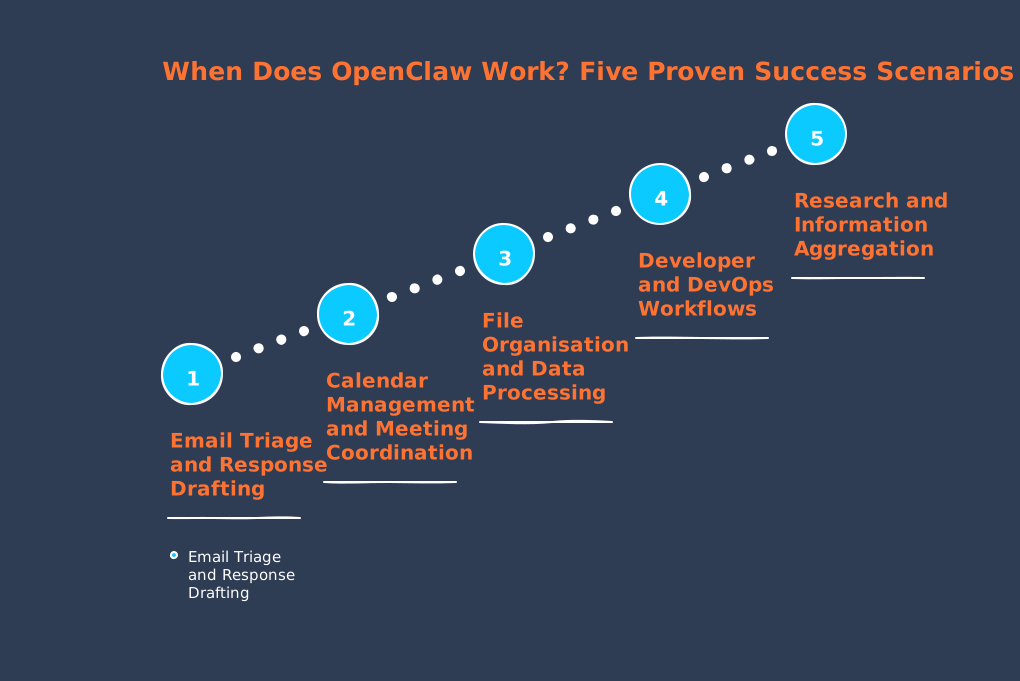
When Does OpenClaw Work? Five Proven Success Scenarios
1. Email Triage and Response Drafting
Email management represents OpenClaw's most reliable use case. The agent reads incoming messages, classifies them by priority, drafts responses to routine enquiries, and flags urgent items for human attention. One documented implementation has the agent summarising unread messages daily and preparing draft responses that users review before sending.
Why does this work so well? Email follows predictable patterns. The consequences of occasional errors are manageable - you review drafts before they go out. The task is asynchronous, meaning delays are acceptable. For professionals managing 50-200 daily emails, users report saving 30-60 minutes per day.
Success metric: Organisations using OpenClaw for email workflows report reducing processing time by 40-60 per cent.
2. Calendar Management and Meeting Coordination
Calendar automation operates on similar principles. OpenClaw checks your availability, responds to meeting requests within set hours, proposes alternate times when busy, and manages multi-person scheduling. Administrative professionals report time savings of 15-25 minutes daily.
The key prerequisite: your scheduling patterns must be relatively standardised. If every meeting requires unique considerations about location, preparation time, or attendee relationships, the agent will struggle.
3. File Organisation and Data Processing
Repetitive file operations suit OpenClaw nicely. Documented use cases include organising downloads into categorised folders, renaming files according to consistent conventions, extracting data from receipts into spreadsheets, and batch-processing document collections.
A common example: a user submits a scanned receipt, and OpenClaw extracts line items, builds an Excel spreadsheet with formatted columns, categorises expenses, and calculates totals - accomplishing in minutes what would take 15-20 minutes by hand.
Warning: File operations carry higher stakes than email. A misconfigured script can delete, overwrite, or corrupt files. Always test on non-critical directories first.
4. Developer and DevOps Workflows
Software developers use OpenClaw for technical workflows, including running tests, monitoring logs, executing deployments, and performing routine maintenance. The agent runs tests, analyses results, and deploys code to staging if tests pass. This automates routine parts of continuous integration.
These setups succeed because they work within set boundaries. Test execution has binary outcomes. Deployment procedures are scripted. However, they need expert configuration from developers who know both the infrastructure and where to limit automation.
5. Research and Information Aggregation
OpenClaw helps with research by gathering data, synthesising findings, and creating structured summaries. Typical uses include monitoring news topics, researching competitors, tracking product prices, and collecting data on business partners.
The success here stems from operating in information-gathering mode rather than action-taking mode. Incomplete research or minor synthesis errors are manageable - humans review the output before acting on it.
When Does OpenClaw Fail? Four Consistent Problem Areas
Token Consumption and Cost Overruns This is where expectations collapse. OpenClaw's token use often exceeds user forecasts by five to ten times, or more. It's like leaving a meter running overnight, where a stray process quietly accumulates charges - often shocking users when they see the bill. A tech blogger expected monthly API costs of about €30 for personal automation. Actual spending reached €3,600 - a 120-fold jump. Background tasks used tokens to maintain context, track schedules, and process memory.
Fast Fact: The user eventually optimised costs to approximately €35 monthly through aggressive session management, model downgrading for simple tasks, and systematic elimination of inefficient processes. But this required expert-level understanding that typical users lack. The main culprit is 'context accumulation.' This means that OpenClaw keeps conversation history and feeds all relevant background (context) to the language model at each step. A simple 100-token (short text segment) task becomes costly if the agent processes thousands of tokens of accumulated background information every time.
Realistic cost expectations:
- Light users (casual daily conversations, occasional automation): €60-150 monthly
- Medium users (multiple automated workflows, 15-minute intervals): €30-70 monthly
- Heavy users (continuous background processes, web browsing, vision tasks): €200+ monthly
For reference, Zapier costs €20 monthly, and n8n costs €9-16 monthly for basic automation. OpenClaw's costs make sense primarily for sophisticated workflows requiring true AI reasoning.
2. Error Recovery and Task Incompletion
A common issue: OpenClaw starts multi-step workflows but often fails to finish them, requiring human help.
Comprehensive testing shows OpenClaw completing structured tasks with clear success/failure criteria approximately 85 per cent of the time. Complex multi-step research workflows? Only 45-60 per cent completion without human intervention.
The failure rate increases exponentially with task complexity:
| Workflow Complexity | Success Rate |
|---|---|
| 3-step workflows | 85% |
| 5-step workflows | 60% |
| 10-step workflows | 30% |
The root cause: as complex tasks execute, the token count (the sum of individual text chunks processed) accumulates, and the context window - the amount of previous information OpenClaw can remember - fills. The agent must compress (summarise) or truncate (cut off) context to continue, which can inadvertently lose important information about original goals or data already handled.
OpenClaw's rapid adoption has unwittingly turned into what could be the largest accidental test bed for threat actors in 2026. Nearly 21,000 OpenClaw instances were publicly exposed on the internet, lacking sufficient safeguards, as of late January 2026. Despite clear documentation recommending SSH tunnels for remote access, this massive oversight highlights a tale of negligence in security practices. The emotional cost of potentially compromised data and breached trust should serve as a stark cautionary tale, urging all users to act swiftly to fortify their deployments against exploitation.
Fast Fact: Cisco security researchers analysed 31,000 agent skills and found 26 per cent contained at least one vulnerability. One popular skill explicitly instructed the bot to send data to external servers without user awareness.
A one-click remote code execution exploit was disclosed in February 2026, requiring victims merely to visit a malicious web page. The attack exploits the fact that OpenClaw servers accept requests from any website without validating WebSocket origin headers.
The skill ecosystem poses additional risks. Third-party plugins can contain malicious payloads, conduct prompt injection attacks, and execute commands without authorisation. When skills achieve popularity through manipulated rankings, supply chain risk amplifies across thousands of deployments.
4. The Integration Architecture Gap
Most agentic AI deployments fail because they lack proper infrastructure for managing how agents access information, what actions they can execute, and how previous decisions inform future behaviour. This isn't a bug - it's an architectural limitation.
Organisations frequently underestimate integration scope. Legacy systems lack adequate API documentation. Enterprise systems require complex OAuth implementations. Multiple integrations compete for limited development resources. Each connection presents authentication challenges, API compatibility issues, and ongoing maintenance burdens.
The "Polling Tax" compounds these problems. Early deployments often have agents repeatedly checking for updates - consuming 95 per cent of API calls unnecessarily, burning through usage quotas, and never achieving real-time responsiveness.
Practical OpenClaw Tips for Successful Implementation
If you've decided OpenClaw fits your use case, these strategies will improve your chances of success:
Start with Single-Purpose Agents
Resist the temptation to create one agent that handles everything. Build separate agents for email, calendar, and file operations. This limits context accumulation, reduces costs, and isolates failures.
Implement Aggressive Session Management
Reset context between task cycles rather than maintaining continuous sessions. This alone can reduce costs by 40-60 percent.
Match Models to Task Complexity
Using Claude Opus (approximately €15 input/€75 output per million tokens) for simple tasks that Claude Haiku (€1/€5 per million tokens) could handle represents a 15-fold cost overrun. Route simple queries to cheaper models; reserve expensive reasoning for genuinely complex work.
Build Approval Gates for Consequential Actions
Never allow autonomous email sending, file deletion, or financial transactions without explicit human approval. The time "saved" by full autonomy evaporates when a single error requires hours to correct.
Monitor Token Consumption Daily
Set up alerts for unexpected consumption spikes. Many cost disasters stem from runaway background processes that users don't notice for weeks.
Secure Your Deployment Properly
Use SSH tunnels for remote access. Never expose your OpenClaw instance directly to the internet. Audit any third-party skills before installation. Treat the agent as a potential attack vector, not just a productivity tool.
When Should You Skip OpenClaw Entirely?
OpenClaw isn't the right choice when:
- You need guaranteed reliability. If a 15-40 percent failure rate on complex tasks is unacceptable, traditional automation tools offer deterministic execution.
- Your workflows are simple. For basic automation (if-this-then-that logic), Zapier or n8n cost less and require no maintenance.
- You lack technical expertise. OpenClaw demands understanding of token economics, session management, security hardening, and system administration.
- You're handling sensitive data. The security vulnerabilities disclosed in early 2026 suggest caution until the ecosystem matures.
- You need enterprise support. Open-source projects don't offer SLAs, guaranteed response times, or dedicated support engineers.
The Professional Alternative: Custom AI Automation
At Flexi IT, we've helped European businesses implement AI automation that actually works - without the trial-and-error costs of DIY deployment. The difference lies in architecture: we build systems with proper error handling, security hardening, and integration governance from day one.
For organisations that need AI automation but can't afford the learning curve (or the security risks) of self-hosted solutions, professional implementation offers predictable costs, guaranteed uptime, and expert maintenance. We handle the complexity so you can focus on your actual business.
Key Terms
- Agentic AI
- AI systems that take autonomous actions rather than simply responding to prompts. OpenClaw is an example of agentic AI.
- Token
- The basic unit of text processing for language models. Roughly 4 characters or 0.75 words. API costs are typically calculated per million tokens.
- Context Window
- The maximum amount of text a language model can consider at once. When exceeded, older information must be compressed or discarded.
- Prompt Injection
- A security attack where malicious instructions are embedded in content the AI processes, causing it to bypass safety guidelines.
- Persistent Memory
- The ability to retain information across sessions, allowing the agent to "remember" previous interactions and accumulated knowledge.
Summary: OpenClaw Reality Check
- OpenClaw excels at: Email triage, calendar management, file organisation, DevOps workflows, and research aggregation - tasks with predictable patterns and manageable failure consequences.
- OpenClaw struggles with: Complex multi-step workflows (30-60% success rate), unpredictable token costs (often 5-10x projections), and security vulnerabilities (21,000+ exposed instances identified).
- Real costs: Expect €60-200+ monthly for API fees alone, plus substantial setup and maintenance time.
- Security reality: 26% of third-party skills contain vulnerabilities. Never expose instances directly to the internet.
- Best approach: Start with single-purpose agents, implement approval gates, match models to task complexity, and monitor costs daily.
- Consider alternatives: For simple automation, Zapier/n8n cost less. For enterprise reliability, professional AI automation services offer predictable outcomes without the learning curve.
OpenClaw represents genuine innovation in autonomous AI agents. But innovation and production-readiness aren't the same thing. Approach with clear expectations, proper security measures, and realistic budgets - or work with professionals who've already navigated the pitfalls.
Need help implementing AI automation that actually works? We at Flexi IT specialise in building reliable, secure automation systems for European businesses. Get in touch to discuss your requirements.


