
How to Connect AI Writing Assistants with WordPress to Streamline Your Content Workflow
You can connect AI writing assistants with WordPress through three practical routes: installing native AI plugins like Jetpack AI or AI Engine directly into your dashboard, linking external platforms such as Jasper or Surfer SEO via API connectors and automation tools like Make.com, or using WordPress.com's brand-new built-in AI Assistant launched in February 2026. Each approach lets you draft, optimise, and publish content without leaving your WordPress environment - cutting production time by 40–60%.
In this guide, we'll cover:
- Why WordPress AI integration matters right now (with fresh 2026 data)
- Three proven methods to connect AI writing assistants with WordPress
- A side-by-side comparison of the top AI writing plugins
- How to choose the right tool for your budget and workflow
- GDPR and EU AI Act considerations for European businesses
- A quick-start setup checklist
Why Does WordPress AI Integration Matter in 2026?
WordPress powers 42.8% of all websites on the internet as of February 2026. That's not a niche platform - it's the backbone of the web. And the way people build and manage content on it has shifted dramatically over the past twelve months.
Fast Fact: The top 40 AI-powered WordPress plugins attracted 315 million visits in a single year, and 93% of web designers now report using AI tools in their daily work (WP Mayor, 2026 data).
Last year, WordPress 6.9 introduced the Abilities API and Model Context Protocol (MCP) support, making AI a first-class citizen in the platform's architecture rather than a bolt-on afterthought. WordPress 7.0, scheduled for April 2026, pushes this further with Phase 3 collaboration features that let AI agents interact with your site through standardised protocols.
For content teams, the practical upshot is simple: you no longer need to copy-paste between ChatGPT and your editor. AI now lives inside WordPress. The question isn't whether to integrate - it's which method suits your team best.
Method 1: Native WordPress AI Plugins
The fastest way to connect an AI writing assistant with WordPress is to install a dedicated plugin. These tools embed AI capabilities directly into the Gutenberg block editor, so you generate, refine, and publish content without ever leaving your dashboard.
Jetpack AI Assistant
Built by Automattic (the company behind WordPress.com), it is the most tightly integrated option available. It sits right inside the block editor toolbar and handles blog posts, structured lists, tables, and even forms. It also corrects grammar, adjusts tone, and generates SEO-friendly titles and meta descriptions.
- Price: From approximately €9/month; 20 free trial requests included
- AI models: Managed by Automattic (uses the new PHP AI Client SDK under the hood)
- Best for: Solo bloggers and small teams who want a plug-and-play experience
Since the WordPress 6.9 update, Jetpack routes its AI requests through the standardised AI Client SDK, which means it automatically selects the most efficient model for each task. You don't fiddle with API keys - it just works.
AI Engine by Meow Apps
If flexibility is your priority, AI Engine is hard to beat. With over 80,000 active installations, it's the most widely used AI plugin in the WordPress ecosystem. It supports OpenAI, Google Gemini, Anthropic Claude, Azure, and even locally hosted models - useful for organisations that need data sovereignty.
- Price: Free version available; Pro from approximately €46/year
- AI models: Bring-your-own-key (BYOK) with multi-provider support
- Best for: Developers, agencies, and teams needing granular control
AI Engine also supports MCP, meaning external AI agents (like Claude or ChatGPT) can manage your WordPress site through natural conversation - creating posts, uploading media, and adjusting settings without you touching the admin panel.
AI Workflow Automation (AIWU)
AIWU takes a different approach. Rather than offering a single AI writing tool, it provides a visual workflow builder that connects over 300 AI models - including ChatGPT, Claude, Perplexity, Grok, DeepSeek, and Gemini - into automated content pipelines. Think of it as a no-code automation layer sitting on top of WordPress.
- Price: Free tier available; premium plans vary by usage
- AI models: 300+ via visual workflow builder
- Best for: Content operations teams running high-volume publishing
You can build workflows that research a topic with Perplexity's Sonar models, draft an article with GPT-4, generate a featured image through Fal.ai, and publish the finished post - all triggered by a single form submission.
Rank Math AI
Rank Math blurs the line between SEO plugin and AI writing assistant. Its Content AI analyses top-ranking pages for your target keyword and then generates content structures, suggests word counts, and recommends related terms to include. You write with real-time SEO scoring visible alongside your draft.
- Price: Free SEO plugin; AI add-on from approximately €4.50/month
- AI models: Managed (integrated into Rank Math's platform)
- Best for: SEO-focused content teams and affiliate marketers
GetGenie AI
GetGenie is purpose-built for WordPress e-commerce. It generates product descriptions, comparison tables, and category pages optimised for both search engines and conversion. With 37+ marketing templates, it covers email sequences, ad copy, and social media posts as well.
- Price: Free version (2,500 credits); paid plans from approximately €5.50/month
- AI models: Managed (no API key required)
- Best for: WooCommerce store owners and product-focused content
Method 2: External AI Platforms via APIs and Automation Tools
Already paying for Jasper, Writesonic, or Surfer SEO? You don't need a separate WordPress plugin. Instead, connect your existing AI platform to WordPress through API integrations or workflow automation tools like Make.com and Zapier.
Surfer SEO's WordPress Plugin
Surfer SEO offers a dedicated WordPress plugin that lets you publish directly from its Content Editor to your site. You write and optimise inside Surfer's interface - complete with real-time SEO analysis, NLP term suggestions, and AI-generated paragraphs - then hit publish. Images transfer automatically to your WordPress media library in the correct positions. No more copy-paste formatting headaches.
Make.com and Zapier Workflows
For fully automated content pipelines, platforms like Make.com let you chain multiple services together. A typical workflow might look like this:
- A new row appears in a Google Sheet (your content calendar)
- Make.com sends the topic to Perplexity AI for research
- The research output feeds into OpenAI's API for article drafting
- The draft publishes to WordPress as a pending review post
- Your editor receives a Slack notification to review
This approach is particularly powerful for agencies managing multiple client sites. At Flexi IT, we've built custom Make.com-to-WordPress pipelines for European clients that reduced their content production cycle from five days to under 24 hours.
Fast Fact: Businesses implementing AI automation solutions consistently report 30–50% faster content production alongside measurable improvements in engagement and search visibility (2025–2026 industry data).
Method 3: WordPress.com's Built-In AI Assistant
In February 2026, WordPress.com launched a native AI Assistant available at no extra cost to Business and Commerce plan subscribers. This is the tightest possible integration - no plugins, no API keys, no configuration.
The assistant generates content directly within blocks, edits images in the Media Library, and supports an @ai mention feature inside block notes for requesting fact-checks, headline alternatives, or paragraph rewrites. It's essentially a co-writer that understands your site's structure, style, and existing content.
The catch? It's only available on WordPress.com-hosted sites, not self-hosted WordPress.org installations. If you're on a self-hosted setup (which most European businesses are), Methods 1 and 2 remain your best options.
Which AI Writing Plugin Should You Choose? A Comparison
| Plugin | Starting Price | AI Models | Best For | API Key Required? |
|---|---|---|---|---|
| Jetpack AI Assistant | ~€9/month | Managed | Bloggers, small teams | No |
| AI Engine | Free / ~€46/year Pro | Multi-provider (BYOK) | Developers, agencies | Yes |
| AIWU | Free tier available | 300+ models | High-volume content ops | Yes |
| Rank Math AI | ~€4.50/month | Managed | SEO-focused teams | No |
| GetGenie AI | Free / ~€5.50/month | Managed | WooCommerce stores | No |
| Elementor AI | ~€45/year | Managed (credit-based) | Visual page builders | No |
| Surfer SEO Plugin | Included with Surfer plan | Surfer's AI | SEO content writers | No (uses Surfer account) |
How to Choose the Right WordPress AI Integration for Your Team
What's your technical comfort level?
If you want zero configuration, go with Jetpack AI or GetGenie - both handle API keys internally. If your team includes developers who want to pick specific models and fine-tune prompts, AI Engine or AIWU give you that control.
What type of content do you produce?
Blog-heavy sites benefit most from Jetpack or Rank Math AI. E-commerce operations should look at GetGenie or AI Power (which includes WooCommerce-specific templates). Agencies managing multiple client sites will find AIWU's visual workflow builder or Make.com automations far more efficient than per-site plugin setups.
How important is data privacy?
European businesses need to think carefully about where their data travels. Plugins that use the bring-your-own-key model (AI Engine, AIWU) let you choose providers that process data in the EU. Some organisations opt for locally hosted AI models through AI Engine to keep everything on-premises - a sensible approach given that the EU AI Act's transparency rules come into force in August 2026.
Fast Fact: Gartner predicts that 40% of enterprise applications will use AI agents by the end of 2026, up from less than 5% in 2025. WordPress's new Abilities API and MCP support position it squarely in this trend.
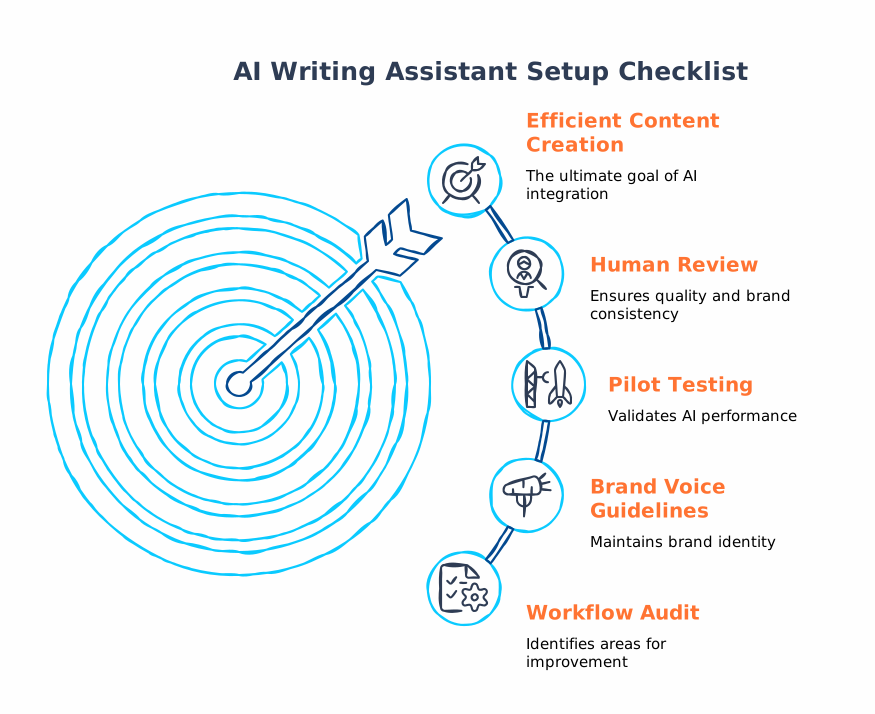
Quick-Start Setup Checklist
Ready to get started? Here's a practical checklist regardless of which method you choose:
- Audit your current workflow. Map out how content moves from idea to publication. Identify bottlenecks across research, drafting, editing, formatting, or publishing.
- Pick your method. Native plugin for simplicity, external platform integration for existing tool stacks, or WordPress.com's assistant if you're on their hosting.
- Install and configure. For BYOK plugins, create API keys with your chosen provider (OpenAI, Anthropic, Google). Set spending limits from day one.
- Define brand voice guidelines. Most premium plugins let you store tone, style, and vocabulary preferences. Do this before generating your first draft - it saves hours of editing later.
- Run a pilot. Test with 5–10 articles before rolling out to the full team. Compare AI-assisted production time against your baseline.
- Set up human review. AI generates drafts. Humans approve them. Always keep a human editor in the loop, especially for content that represents your brand publicly.
If this feels like a lot to manage alongside running your business, that's understandable. We help European SMEs implement exactly these kinds of WordPress AI integrations at Flexi IT - from plugin selection to fully automated content pipelines.
GDPR and EU AI Act: What European Businesses Need to Know
This isn't optional reading for European businesses - it's essential. Two regulatory frameworks directly affect how you use AI writing assistants with WordPress:
- GDPR: If your AI plugin processes any personal data (e.g., user-generated content, customer queries fed into chatbots), you need to ensure the data processor complies with GDPR. Check whether data is transmitted outside the EU and whether the plugin provider has a Data Processing Agreement (DPA) in place.
- EU AI Act: The transparency rules take effect in August 2026. If you use AI to generate content that could be mistaken for human-written material, you may need to disclose that AI was involved. This is particularly relevant for customer-facing chatbots and automated email content.
Plugins with BYOK models give you the most control here, since you can select AI providers with EU-based infrastructure. Locally hosted models (supported by AI Engine) eliminate cross-border data transfer concerns entirely.
Key Terms
- BYOK (Bring Your Own Key): A pricing model where you supply your own API key from an AI provider (e.g., OpenAI), giving you direct cost control and provider choice.
- MCP (Model Context Protocol): A standardised protocol introduced in WordPress 6.9 that allows AI agents to interact with WordPress sites through structured commands.
- Abilities API: A WordPress 6.9 feature that lets plugins and themes declare what AI capabilities they support, enabling standardised AI interactions across the ecosystem.
- Gutenberg: The default WordPress block editor, where most AI writing plugins embed their functionality.
- Workflow automation: Using platforms like Make.com or Zapier to connect multiple tools into automated sequences (e.g., research → draft → publish).
Summary for Busy Decision-Makers
- You can connect AI writing assistants with WordPress through native plugins, external API integrations, or WordPress.com's built-in assistant.
- Native plugins like Jetpack AI, AI Engine, and AIWU embed AI directly into the Gutenberg editor - no context switching required.
- External tools (Surfer SEO, Make.com, Zapier) let you keep existing AI subscriptions and automate the WordPress publishing step.
- WordPress 6.9's Abilities API and MCP support make AI a core platform feature, not an afterthought.
- Budget-friendly options start from as little as €4.50/month; BYOK models keep costs transparent and scalable.
- European businesses must account for GDPR compliance and the EU AI Act (transparency rules effective August 2026).
- If you need help implementing any of this, Flexi IT specialises in WordPress AI integration for European businesses.


